Unblock That is a puzzle game where you move blocks within a limited number of moves to create a path for the red block. Play this game on Block Blast.
Unblock That presents hundreds of mind-bending puzzles that challenge your intelligence through the core task of moving regular blocks to create a path for the red block to the exit. If you are new to this type of puzzle game, don't worry. Below are some basic rules to help you quickly understand how to play Unblock That online.
Visit the Block Blast website and find this game in the New Games or Puzzle Games section.
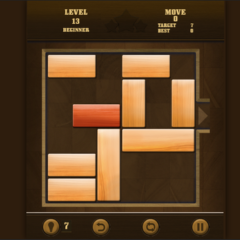
How many moves do you need to solve level 13?
Press and hold the LMB key to select and move each block. This is a one-button game, with very simple controls. Similarly, when playing Unblock That online on a mobile device, touch the touchscreen and move the blocks in your desired direction.
If you find the challenges in Unblock That appealing, then you will surely love Free The Key. These two games are very similar in gameplay and strategy, but Free The Key adds a mystical element of sacred shrines where you are trying to retrieve the key hidden in a secret square. The ASMR sound effects as you move each block also significantly enhance your gaming experience. And in my personal experience, Free The Key has a higher difficulty level, right from the first levels.
A challenging game, Unblock That is definitely worth trying. Play this game today!